 简体中文
简体中文  English
  한국어
한국어  Deutsch






A common end-of-life criterion for lithium-ion cells is when the measured discharge capacity falls to 80% of its initial value. This document demonstrates how to configure an Arbin test schedule to automatically cycle a cell until this threshold is reached.
Overall test procedure:
Initial capacity measurement → Cycling loop → Compare capacity to 80% → Continue / End
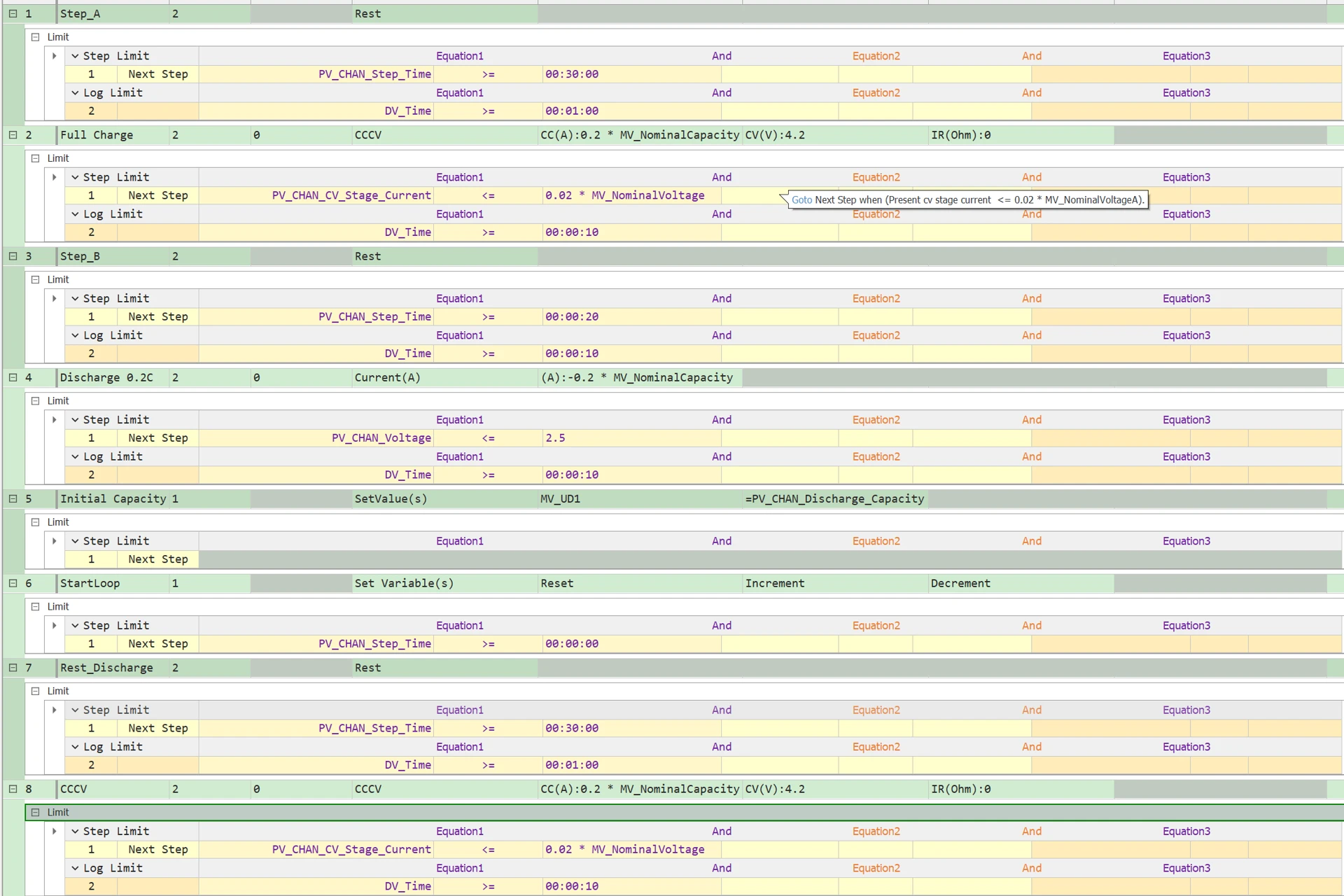
In this example, we assume that the cell has a minimum voltage of 2.5 V and a maximum voltage of 4.2 V.
Step 1: Initial Rest
Allow the battery to rest for 10–30 minutes so that the voltage can stabilize. In this example, the rest time is set to 30 minutes.
Step 2: Run a CC-CV charge process
CC (constant current): Charge the battery at a constant current. In this example, 0.2C is used to obtain a stable baseline capacity measurement. Other charge/discharge rates, such as 0.5C or 1C, may be used depending on the cell specification and test requirements.
When the voltage reaches 4.2 V, switch to CV (constant voltage) mode and hold the voltage at 4.2V
End the charge when the current tapers down to a preset cutoff value, typically 0.05C or 0.02C. In this example, the cutoff current is set to 0.02C.
Step 3: Rest After Charge
Let the battery rest for 10–30 minutes, in this case it’s 30 minutes
Step 4: Discharge the Battery to Measure Initial Capacity
Run a CC (constant current) discharge:
-
Discharge the battery at a constant current. In this example, the current is set to 0.2C. In other cases, 0.5C or 1C may be used when testing under higher-load conditions.
-
Stop the discharge when the voltage drops to 2.5 V.
Step 5: During Step 4, the system calculates the discharge capacity over the entire discharge process. In Step 5, the total discharge capacity is recorded in the variable MV_UD1 using the Set Values control type.
Step 6: Start a loop using the Set Variable(s) control type. In this step, we reset the Discharge Capacity parameter along with three other parameters; otherwise, these values would continue to accumulate during the subsequent cycles.

The loop here is defined as Steps 6 through 11.
Step 7: Rest After Discharge
Let the battery rest for 10–30 minutes, in this case it’s 30 minutes
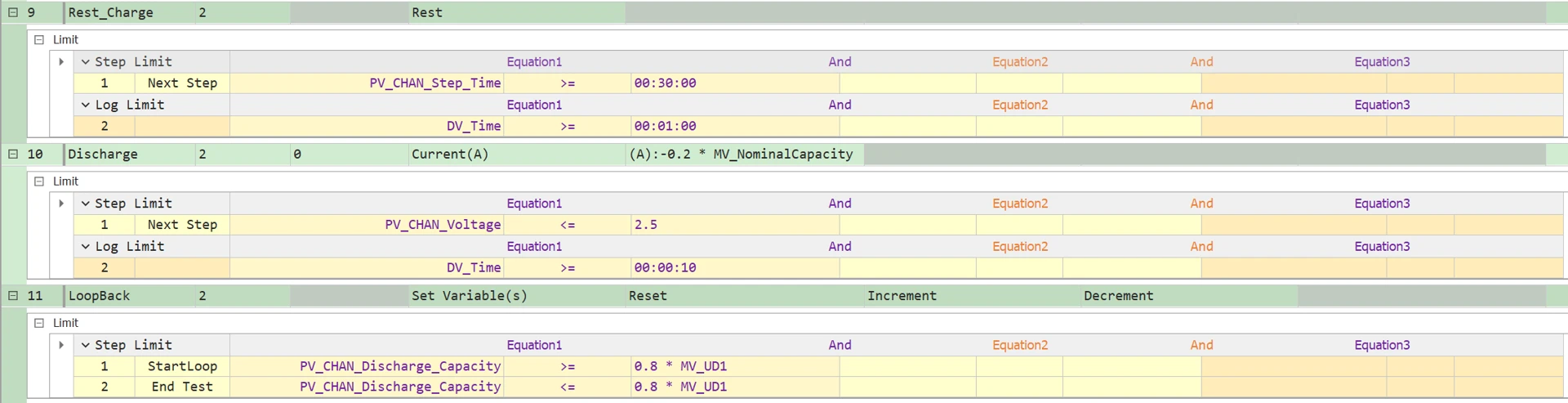
Steps 8, 9, and 10: These steps are the same as Steps 2, 3, and 4, respectively.
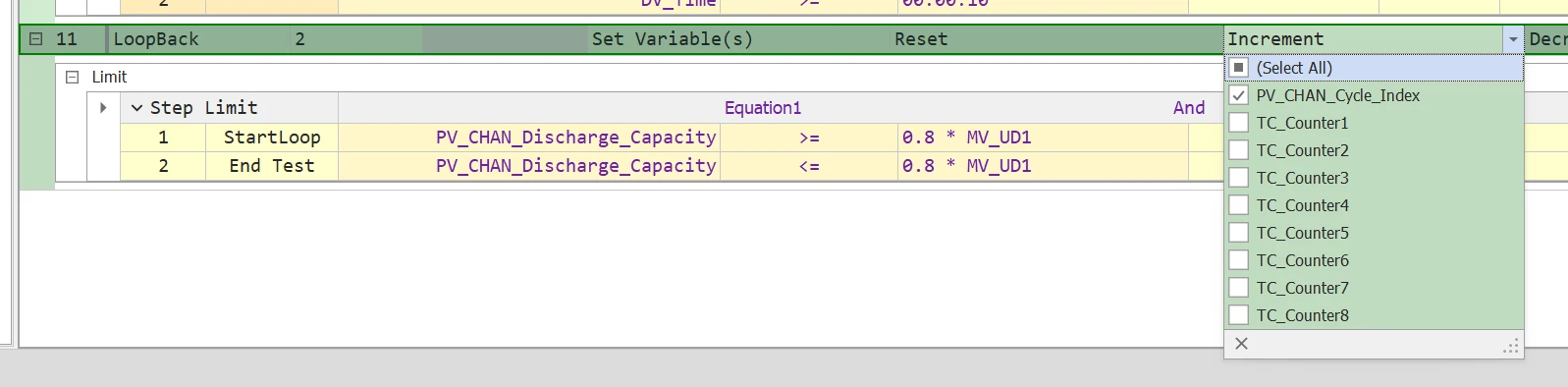
Step 11: Increase the cycle index without resetting any parameters.
The step limit is configured as follows: if the discharge capacity in the most recent cycle is less than 80% of the initial capacity, the test is terminated. Otherwise, the procedure returns to Step 6, which marks the beginning of the loop.
You can download this schedule template below and configure the parameters:

