Deutsch
  English
  简体中文
简体中文  한국어
한국어 




What is a Pulse step?
A Pulse applies a rapid sequence of current steps, each held for a set time in milliseconds, producing a square-wave load instead of a steady one. It is used for short-duration, high-rate testing — internal resistance (DCIR) measurement, pulse-power characterization, and simulating the bursty current draw of real devices.
How is a Pulse defined in Arbin?
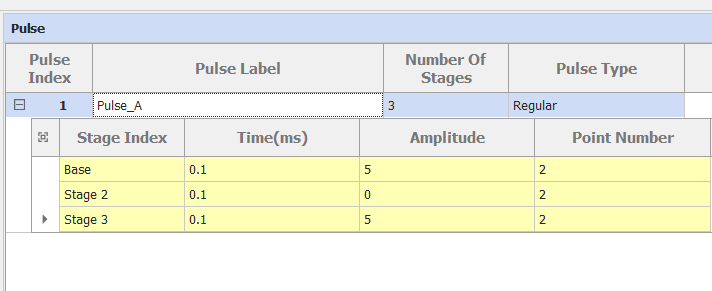
At two levels, the same way CV is:
Pulse level — identifies the routine and how it behaves overall: Pulse Index, Pulse Label, Number Of Stages, and Pulse Type.
Stage level — each stage sets the Time (ms), Amplitude, and Point Number for one step of the waveform.
What do the Pulse-level settings do?
Pulse Index — row number of the pulse definition
Pulse Label — identifier for the routine (e.g. Pulse_A)
Number Of Stages — how many current steps make up one pulse
Pulse Type — the waveform pattern: Regular, GSM, CDMA, or CDMA2
What are the Pulse Type options?
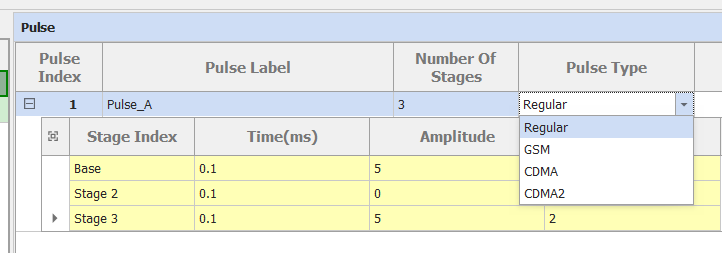
Regular — a plain user-defined waveform; the stage table below defines it step by step.
GSM / CDMA / CDMA2 — preset profiles that mimic the transmit-current patterns of those mobile communication standards, for testing batteries under realistic handset loads.
What do the stage-level settings do?
Each stage is one flat segment of the waveform. The first is the Base stage; the rest are numbered (Stage 2, Stage 3, …) and run in order to complete one pulse.
Time (ms) — how long the segment is held
Amplitude — the current applied during the segment (a current, not a voltage)
Point Number — how many data points are recorded across the segment
Can you walk through an example?
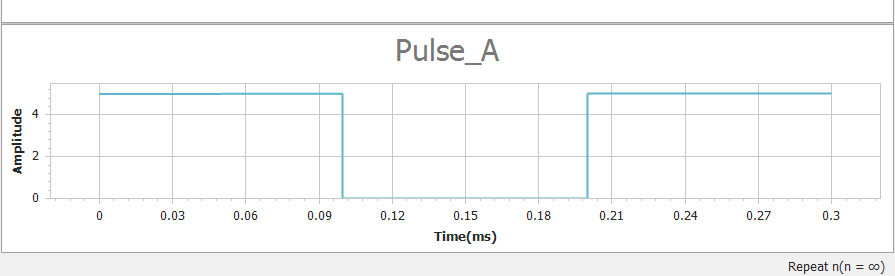
Pulse_A is a Regular pulse with three stages, each lasting 0.1 ms and recording 2 points:
Base — current 5
Stage 2 — current 0
Stage 3 — current 5
The result is a 0.3 ms burst that steps to full current, drops to zero, then returns to full current — an on/off/on square pulse.