 Deutsch
  English
  简体中文
简体中文  한국어
한국어 
Führungsbatterie-Innovation: Arbin auf der Battery Show India 2025
Wir freuen uns, Ihnen mitteilen zu können, dass Arbin an The Battery teilnehmen wird…

Wir freuen uns, Ihnen mitteilen zu können, dass Arbin an The Battery teilnehmen wird…
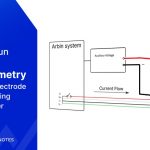
I. Einführung in die 3E-Zelle Bei einer Batterie mit 2 Elektroden…

Arbin Instruments hatte die Ehre teilzunehmen…

Die Eventfotos von ICNaB 2025 zeigen deutlich Arbins starke…
No. The MZTC cannot control temperatures below 0°C. The widest temperature range of the MZTC is 10°C to 60°C. However, the actual operating range may be narrower depending on the ambient temperature: The lower limit is 10°C or ambient temperature minus 10°C, whichever is higher. The upper limit is 60°C or ambient temperature plus 40°C, […]
Yes. Arbin offers several products that can help simplify and organize the connection between the battery and the cycler. I. Single Coin Cell Holder With the Phoenix connector, the holder can be plugged directly into the machine’s channel port. II. 8-Channel Universal Coin Cell Battery Holder Tray Part Number: 409716 This tray allows up to […]
Grundsätzlich gilt es, einige Punkte zu beachten: Die Arbin Maschinen haben üblicherweise einen Arbeitsumgebungstemperaturbereich von 0°C bis 30°C. Bitte bereiten Sie die Klimatisierungsanlage entsprechend vor. Das Stromnetz muss entsprechend den Stromversorgungsanforderungen der Maschine vorbereitet sein. Manche Maschinen benötigen beispielsweise einen einphasigen Stromanschluss, während andere einen Drehstromanschluss benötigen […]
Arbin systems will be shipped with a computer that includes the full software kit pre-installed. The system hardware setup is simple: customers can easily set it up themselves by connecting the cycler to the computer and auxiliary devices using Ethernet cables. Figure 1: Example TCP/IP Connection to Arbin Main System The software is fully installed. […]
Normal bank wire transfer is preferred. We avoid LC. Arbin’s standard payment mode is 40% – 40% – 20%. The first 40% is due right after the PO is received. Production starts only after Arbin’s bank account receives this payment. Lead time counts from this moment, not from PO receipt. The second 40% is due […]
This error occurs only when the Channel Based Voltage Clamp option is unchecked in ArbinAdvSys.cfg. This means all IV channels on the same IV channel board share one voltage clamp/voltage check. The MITS software must ensure all schedules on the same IV board channels share the same Voltage Clamp setting; otherwise, the Conflict Clamp V […]
This error means the Aux channel lost communication with IV channels. It usually occurs when the Batch/Mapping file was created or modified without downloading it to the cycler. Downloading the Batch/Mapping file resolves this issue: If this does not resolve the issue, check the cable connection from the Aux module to the computer. If the […]
Installing a battery inside the chambers or glovebox is optional, Arbin can integrate it if customers need it for testing. Arbin offers an 8-zone temperature chamber for battery testing (MZTC) with an operating temperature of 10-60C and for cells rated up to 60A. Connections are made easy with the cables between the chamber and tester. […]
There are several way to connect to the DUT as follows: Individual cables Individual cell holders (coin cells, cylindrical cells, flat/pouch cells) Trays for holding multiple cells (coin cells, cylindrical cells, flat/pouch cells) Racks for organizing cells Chambers We will go to each method one by one as follows: 1. Individual cables It could be […]
The “IR Inf” error occurs when the system fails to obtain a valid result during an Internal Resistance (IR) measurement step. This typically happens when the measurement conditions are not sufficient to produce a reliable calculation, causing the system to return an infinite (invalid) resistance value and stop the test. Solution: Make sure the amplitude […]
The answer is yes and no. Yes, if those chambers use the same communication protocol. For example, Votsch VT4002 and Weiss WT20/40 use the Votsch L4006 protocol. If you have these two chambers, you only need one MTCI unit. However, if you have another chamber like Espec SU-241 that uses the Espec SCP220/SCP-N300/SCP310 protocol, you […]
Yes. Arbin Data Watcher software (Version 2.2.217 and later) can do this. In Data Watcher software, click “Edit Chart Template”. From the Model dropdown, select “CycleCompare”. Return to the main window of Data Watcher. In the axis configuration, you can select the physical quantity for the X, Y1, and Y2 axes. In this example, X […]
